---
title: "File Transfer Monitor configuration"
description: ""
url: "https://docs.itrsgroup.com/docs/geneos/7.11.0/collection/ftm-config/index.html"
---
## Overview

Geneos Universal FTM plugin allows for monitoring arrival times of files.

It is typically employed where the Exchange FTPs the previous day's trading reports to the client. These reports are expected to arrive at pre-defined times so that they can be automatically picked up by the back office systems for further processing.

If a report is late, but before the 'drop dead' time, it can be flagged as an amber warning condition. If the report is not available after the 'drop dead' time, this can be flagged as a red critical condition.

For example, consider a report file that is expected to be FTPd from the Exchange at 05:00 with a back office system programmed to process it at 05:30. If the report arrives before 05:00, the FTM will show green status, if the report arrives between 05:00 and 05:29:59, the status is amber, and if the report has not arrived or arrived after the 05:29:59 the status is red.

FTM works by dividing the time into monitoring periods. By default, a monitoring period starts at 12:00 noon and finishes 11:59:59 the following day. The FTM plugin is aware of the current monitoring period and any files that exist, are ignored if their timestamp is outside of the monitoring period. This ensures that FTM monitors for fresh file arrivals and does not confuse them with older files that may be there from the previous monitoring period.

It is possible to switch the monitoring period between `Noon_to_noon`, as described above, and `Midnight_to_midnight`.


**Note**

  Monitoring periods for holiday dates and days are ignored only for daily expected period. See [files > file > expectedPeriod](#files--file--expectedperiod) for more details on expected periods.
 

### View

The FTM plugin can be used to monitor arrival times of any file, for example the log file of a batch process that must be run at a specific time.


**Note**

  The date and time used by the FTM plugin are always in the timezone of the Netprobe running the sampler. 


By default, all dates and times are displayed in a standard FTM format that is always in the local time of the Netprobe. The date and time format can be changed to ISO8601 format, which includes the local timezone offset. Please see [displayTimeInIso8601Format in configuration](#displaytimeiniso8601format).

![](https://docscdn.itrsgroup.com/geneos/images/plug-ins/ftm-dataview-5-14.png)

#### Headline Legend

<div class="table-container">
<table class="legacy-table" style="width: 100%;margin-left: 0;margin-right: auto;mc-table-style: url('../Resources/TableStyles/ref_2_col_table.css');" class="TableStyle-ref_2_col_table" cellspacing="0">
                <col class="TableStyle-ref_2_col_table-Column-Column1"/>
                <col class="TableStyle-ref_2_col_table-Column-Column1"/>
                <thead>
                    <tr class="TableStyle-ref_2_col_table-Head-Header1">
                        <th class="TableStyle-ref_2_col_table-HeadE-Column1-Header1">Name</th>
                        <th class="TableStyle-ref_2_col_table-HeadD-Column1-Header1">Description</th>
                    </tr>
                </thead>
                <tbody>
                    <tr class="TableStyle-ref_2_col_table-Body-Body1">
                        <td class="TableStyle-ref_2_col_table-BodyE-Column1-Body1">totalFilesExpected</td>
                        <td class="TableStyle-ref_2_col_table-BodyD-Column1-Body1">Number of files configured.</td>
                    </tr>
                    <tr class="TableStyle-ref_2_col_table-Body-Body1">
                        <td class="TableStyle-ref_2_col_table-BodyE-Column1-Body1">filesDelayed</td>
                        <td class="TableStyle-ref_2_col_table-BodyD-Column1-Body1">Number of files that have not arrived yet and are past their due arrival time.</td>
                    </tr>
                    <tr class="TableStyle-ref_2_col_table-Body-Body1">
                        <td class="TableStyle-ref_2_col_table-BodyE-Column1-Body1">lateArrivals</td>
                        <td class="TableStyle-ref_2_col_table-BodyD-Column1-Body1">Number of files that have arrived, but later than expected, i.e. where the Delay time is greater than zero.</td>
                    </tr>
                    <tr class="TableStyle-ref_2_col_table-Body-Body1">
                        <td class="TableStyle-ref_2_col_table-BodyE-Column1-Body1">totalReceived</td>
                        <td class="TableStyle-ref_2_col_table-BodyD-Column1-Body1">Number of files received.</td>
                    </tr>
                    <tr class="TableStyle-ref_2_col_table-Body-Body1">
                        <td class="TableStyle-ref_2_col_table-BodyB-Column1-Body1"> </td>
                        <td class="TableStyle-ref_2_col_table-BodyA-Column1-Body1"> </td>
                    </tr>
                </tbody>
            </table>
            
</div>

#### Table Legend

<div class="table-container">
<table class="legacy-table" style="width: 100%;margin-left: 0;margin-right: auto;mc-table-style: url('../Resources/TableStyles/ref_2_col_table.css');" class="TableStyle-ref_2_col_table" cellspacing="0">
                <col class="TableStyle-ref_2_col_table-Column-Column1"/>
                <col class="TableStyle-ref_2_col_table-Column-Column1"/>
                <thead>
                    <tr class="TableStyle-ref_2_col_table-Head-Header1">
                        <th class="TableStyle-ref_2_col_table-HeadE-Column1-Header1">Name </th>
                        <th class="TableStyle-ref_2_col_table-HeadD-Column1-Header1">Description</th>
                    </tr>
                </thead>
                <tbody>
                    <tr class="TableStyle-ref_2_col_table-Body-Body1">
                        <td class="TableStyle-ref_2_col_table-BodyE-Column1-Body1">Filename</td>
                        <td class="TableStyle-ref_2_col_table-BodyD-Column1-Body1">
                            <p>Name of the file or its alias.</p>
                            <p>The <strong>Filename</strong> column can only display up to 255 characters. Paths or aliases longer than 255 characters will be truncated, but they can still be detected and monitored. The <strong>View File</strong> and <strong>Accept File Delay</strong> commands will still work as expected, even if the displayed path or alias is truncated. </p>
                            <div>
                                <p class="caution">Caution: Beginning Windows 10, long paths can be enabled but the FTM plugin may not detect paths longer than 260 characters. For more information on long paths in Windows, see <a href="https://docs.microsoft.com/en-us/windows/win32/fileio/maximum-file-path-limitation?tabs=registry#enable-long-paths-in-windows-10-version-1607-and-later">Enable Long Paths in Windows 10, Version 1607, and Later</a>.</p>
                            </div>
                        </td>
                    </tr>
                    <tr class="TableStyle-ref_2_col_table-Body-Body1">
                        <td class="TableStyle-ref_2_col_table-BodyE-Column1-Body1">expectedTime</td>
                        <td class="TableStyle-ref_2_col_table-BodyD-Column1-Body1">Time the file is expected.</td>
                    </tr>
                    <tr class="TableStyle-ref_2_col_table-Body-Body1">
                        <td class="TableStyle-ref_2_col_table-BodyE-Column1-Body1">arrivalTime</td>
                        <td class="TableStyle-ref_2_col_table-BodyD-Column1-Body1">Time the file has arrived.</td>
                    </tr>
                    <tr class="TableStyle-ref_2_col_table-Body-Body1">
                        <td class="TableStyle-ref_2_col_table-BodyE-Column1-Body1">Delay</td>
                        <td class="TableStyle-ref_2_col_table-BodyD-Column1-Body1">Number of seconds the file is delayed by, counted from the expected time. If the file arrives before its expected time, the delay is set to zero.</td>
                    </tr>
                    <tr class="TableStyle-ref_2_col_table-Body-Body1">
                        <td class="TableStyle-ref_2_col_table-BodyE-Column1-Body1">currentFileSize</td>
                        <td class="TableStyle-ref_2_col_table-BodyD-Column1-Body1">Current size of the file that was transferred. This can be used to detect files that have not transferred properly.</td>
                    </tr>
                    <tr class="TableStyle-ref_2_col_table-Body-Body1">
                        <td class="TableStyle-ref_2_col_table-BodyE-Column1-Body1">actualFilename</td>
                        <td class="TableStyle-ref_2_col_table-BodyD-Column1-Body1">Actual file being monitored that is only visible if  <a href="https://docs.itrsgroup.com/docs/geneos/7.11.0/collection/ftm-config/index.html#showActualFilename">showActualFilename</a> is set.</td>
                    </tr>
                    <tr class="TableStyle-ref_2_col_table-Body-Body1">
                        <td class="TableStyle-ref_2_col_table-BodyE-Column1-Body1">periodStart</td>
                        <td class="TableStyle-ref_2_col_table-BodyD-Column1-Body1">Start of the current monitoring period.</td>
                    </tr>
                    <tr class="TableStyle-ref_2_col_table-Body-Body1">
                        <td class="TableStyle-ref_2_col_table-BodyE-Column1-Body1">periodEnd</td>
                        <td class="TableStyle-ref_2_col_table-BodyD-Column1-Body1">End of the current monitoring period.</td>
                    </tr>
                    <tr class="TableStyle-ref_2_col_table-Body-Body1">
                        <td class="TableStyle-ref_2_col_table-BodyB-Column1-Body1"> </td>
                        <td class="TableStyle-ref_2_col_table-BodyA-Column1-Body1"> </td>
                    </tr>
                </tbody>
            </table>
            
</div>

## Plugin Configuration

The following parameters can be configured for this plugin:

### files

Allows the configuration of files.

Mandatory: Yes

### files > file > path

The full path to the file.

Example:

```
/usr/data/FileX.dat
```

If `<today>`, including the `< >` brackets, is specified as part of the file name, it will result in the automatic substitution of the date in `yyyymmdd` format.

Additionally, you can include one or more formatting codes to format the date - `<today%d%m%Y>`.

Also, in place of the `<today>` keyword, you can use these keywords when specifying the filename:

<div class="table-container">
<table class="legacy-table"   style="width: 100%;mc-table-style: url('../Resources/TableStyles/ref_2_col_table.css');margin-left: 0;margin-right: auto;" cellspacing="0">
                    <col style="width: 498px;" class="TableStyle-ref_2_col_table-Column-Column1"/>
                    <col style="width: 1221px;" class="TableStyle-ref_2_col_table-Column-Column1"/>
                    <thead>
                        <tr class="TableStyle-ref_2_col_table-Head-Header1">
                            <th class="TableStyle-ref_2_col_table-HeadE-Column1-Header1">Date keyword</th>
                            <th class="TableStyle-ref_2_col_table-HeadD-Column1-Header1">Description</th>
                        </tr>
                    </thead>
                    <tbody valign="top">
                        <tr class="TableStyle-ref_2_col_table-Body-Body1">
                            <td class="TableStyle-ref_2_col_table-BodyE-Column1-Body1"><code class="docutils literal">&lt;today...&gt;</code>
                            </td>
                            <td class="TableStyle-ref_2_col_table-BodyD-Column1-Body1">Current date.</td>
                        </tr>
                        <tr class="TableStyle-ref_2_col_table-Body-Body1">
                            <td class="TableStyle-ref_2_col_table-BodyE-Column1-Body1"><code class="docutils literal">&lt;today+x...&gt;</code>
                            </td>
                            <td class="TableStyle-ref_2_col_table-BodyD-Column1-Body1">Current date + x actual days.   This does not include the monitored days and holidays.</td>
                        </tr>
                        <tr class="TableStyle-ref_2_col_table-Body-Body1">
                            <td class="TableStyle-ref_2_col_table-BodyE-Column1-Body1"><code class="docutils literal">&lt;today-x...&gt;</code>
                            </td>
                            <td class="TableStyle-ref_2_col_table-BodyD-Column1-Body1">Current date - x actual days.   This does not include the monitored days and holidays.</td>
                        </tr>
                        <tr class="TableStyle-ref_2_col_table-Body-Body1">
                            <td class="TableStyle-ref_2_col_table-BodyE-Column1-Body1"><code class="docutils literal">&lt;yesterday...&gt;</code>
                            </td>
                            <td class="TableStyle-ref_2_col_table-BodyD-Column1-Body1">
                                <p>Actual date
							yesterday with respect to holidays.</p>
                                <p>For example, if today is <code>Monday</code>, and <code>Saturday</code> and <code>Sunday</code> are set as holidays, then the <code>yesterday</code> tag is the date of the previous <code>Friday</code>.</p>
                            </td>
                        </tr>
                        <tr class="TableStyle-ref_2_col_table-Body-Body1">
                            <td class="TableStyle-ref_2_col_table-BodyE-Column1-Body1"><code class="docutils literal">&lt;tomorrow...&gt;</code>
                            </td>
                            <td class="TableStyle-ref_2_col_table-BodyD-Column1-Body1">Actual date tomorrow.</td>
                        </tr>
                        <tr class="TableStyle-ref_2_col_table-Body-Body1">
                            <td class="TableStyle-ref_2_col_table-BodyE-Column1-Body1"><code class="docutils literal">&lt;previous_monitored_day...&gt;</code>
                            </td>
                            <td class="TableStyle-ref_2_col_table-BodyD-Column1-Body1">
                                <p>Previous day with respect
 to holidays and monitored days.</p>
                                <p>If both  <a href="https://docs.itrsgroup.com/docs/geneos/7.11.0/collection/ftm-config/index.html#holidays">holidays</a> and  <a href="https://docs.itrsgroup.com/docs/geneos/7.11.0/collection/ftm-config/index.html#monitoredDays">monitoredDays</a> are configured, then only holiday dates are honored while holiday days are ignored.</p>
                            </td>
                        </tr>
                        <tr class="TableStyle-ref_2_col_table-Body-Body1">
                            <td class="TableStyle-ref_2_col_table-BodyE-Column1-Body1"><code class="docutils literal">&lt;previous_monitored_day-x...&gt;</code>
                            </td>
                            <td class="TableStyle-ref_2_col_table-BodyD-Column1-Body1">
                                <p>Previous monitored day minus the previous x number of monitored days. This includes holidays and monitored days.</p>
                                <p>If both  <a href="https://docs.itrsgroup.com/docs/geneos/7.11.0/collection/ftm-config/index.html#holidays">holidays</a> and  <a href="https://docs.itrsgroup.com/docs/geneos/7.11.0/collection/ftm-config/index.html#monitoredDays">monitoredDays</a> are configured, then only the holiday dates are honored but the holiday days are ignored.</p>
                            </td>
                        </tr>
                        <tr class="TableStyle-ref_2_col_table-Body-Body1">
                            <td class="TableStyle-ref_2_col_table-BodyE-Column1-Body1"><code class="docutils literal">&lt;next_monitored_day...&gt;</code>
                            </td>
                            <td class="TableStyle-ref_2_col_table-BodyD-Column1-Body1">
                                <p>Next day with respect to
 holidays and monitored days.</p>
                                <p>If both  <a href="https://docs.itrsgroup.com/docs/geneos/7.11.0/collection/ftm-config/index.html#holidays">holidays</a> and  <a href="https://docs.itrsgroup.com/docs/geneos/7.11.0/collection/ftm-config/index.html#monitoredDays">monitoredDays</a> are configured, then only the holiday dates are honored but the holiday days are ignored.</p>
                            </td>
                        </tr>
                        <tr class="TableStyle-ref_2_col_table-Body-Body1">
                            <td class="TableStyle-ref_2_col_table-BodyE-Column1-Body1"><code class="docutils literal">&lt;next_monitored_day+x...&gt;</code>
                            </td>
                            <td class="TableStyle-ref_2_col_table-BodyD-Column1-Body1">
                                <p>Next monitored day plus the next x number of monitored days. This includes the holidays and monitored days.</p>
                                <p>If both  <a href="https://docs.itrsgroup.com/docs/geneos/7.11.0/collection/ftm-config/index.html#holidays">holidays</a> and  <a href="https://docs.itrsgroup.com/docs/geneos/7.11.0/collection/ftm-config/index.html#monitoredDays">monitoredDays</a> are configured, then only the holiday dates are honored but the holiday days are ignored.</p>
                            </td>
                        </tr>
                        <tr class="TableStyle-ref_2_col_table-Body-Body1">
                            <td class="TableStyle-ref_2_col_table-BodyB-Column1-Body1"> </td>
                            <td class="TableStyle-ref_2_col_table-BodyA-Column1-Body1"> </td>
                        </tr>
                    </tbody>
                </table>
                
</div>

Sample path configuration details for FTM plugin:

![](https://docscdn.itrsgroup.com/geneos/images/plug-ins/ftm-setting-5-14.png)

![](https://docscdn.itrsgroup.com/geneos/images/plug-ins/ftm-dataview-5-14.png)

#### Date keyword expansions

When using the `+x` or `-x` values into the date keywords to offset the date on the filename, note the following behaviours when introducing spaces (depicted as the `␣` character) in formatting:

<div class="table-container">
<table class="legacy-table" style="width: 100%; mc-table-style: url('../Resources/TableStyles/ref_2_col_table.css'); margin-left: 0; margin-right: auto;" class="TableStyle-ref_2_col_table" cellspacing="0">
                        <col class="TableStyle-ref_2_col_table-Column-Column1"/>
                        <col class="TableStyle-ref_2_col_table-Column-Column1"/>
                        <thead>
                            <tr class="TableStyle-ref_2_col_table-Head-Header1">
                                <th class="TableStyle-ref_2_col_table-HeadE-Column1-Header1">Date keyword expansion format</th>
                                <th class="TableStyle-ref_2_col_table-HeadD-Column1-Header1">Behaviour and outcome</th>
                            </tr>
                        </thead>
                        <tbody>
                            <tr class="TableStyle-ref_2_col_table-Body-Body1">
                                <td class="TableStyle-ref_2_col_table-BodyE-Column1-Body1"><code class="docutils literal">&lt;today&#9251;&gt;</code>
                                </td>
                                <td class="TableStyle-ref_2_col_table-BodyD-Column1-Body1">Ignores the space and uses the default <code class="docutils literal">%Y%m%d</code> format.  If the date today is 30 June 2018, then the outcome is: <code class="docutils literal">20180630.dat</code> </td>
                            </tr>
                            <tr class="TableStyle-ref_2_col_table-Body-Body1">
                                <td class="TableStyle-ref_2_col_table-BodyE-Column1-Body1"><code class="docutils literal">&lt;today&#9251;%Y&#9251;%m&#9251;%d&#9251;&gt;</code>
                                </td>
                                <td class="TableStyle-ref_2_col_table-BodyD-Column1-Body1">Ignores the spaces around the date format, but includes the spaces in-between.  If the date today is 30 June 2018, then the outcome is: <code class="docutils literal">2018 06 30.dat</code></td>
                            </tr>
                            <tr class="TableStyle-ref_2_col_table-Body-Body1">
                                <td class="TableStyle-ref_2_col_table-BodyE-Column1-Body1"><code class="docutils literal">&lt;today&#9251;+&#9251;10&#9251;&gt;</code>
                                </td>
                                <td class="TableStyle-ref_2_col_table-BodyD-Column1-Body1">Ignores the spaces and uses the default <code class="docutils literal">%Y%m%d</code> format. This format also offsets by the value of the number indicated.  If the date today is 30 June 2018, then the outcome is: <code class="docutils literal">20180710.dat</code></td>
                            </tr>
                            <tr class="TableStyle-ref_2_col_table-Body-Body1">
                                <td class="TableStyle-ref_2_col_table-BodyE-Column1-Body1"><code class="docutils literal">&lt;today&#9251;+&#9251;1&#9251;0&#9251;&gt;</code>
                                </td>
                                <td class="TableStyle-ref_2_col_table-BodyD-Column1-Body1">Offsets by the value of the first digit, and interprets the subsequent digit as the format string. As a consequence, this format renders the offset invisible, even though the offset is in effect due to the first digit.  Regardless of the date, the outcome is: <code class="docutils literal">0.dat</code></td>
                            </tr>
                            <tr class="TableStyle-ref_2_col_table-Body-Body1">
                                <td class="TableStyle-ref_2_col_table-BodyB-Column1-Body1"><code class="docutils literal">&lt;today&#9251;+&#9251;1&#9251;0&#9251;%Y-%m-%d&#9251;&gt;</code>
                                </td>
                                <td class="TableStyle-ref_2_col_table-BodyA-Column1-Body1">Offsets by the value of the first digit, and interprets the subsequent digit as part of the <code class="docutils literal">%Y-%m-%d</code> format.   If the date today is 30 June 2018, then the outcome is: <code class="docutils literal">0 2018-07-01.dat</code></td>
                            </tr>
                        </tbody>
                    </table>
                
</div>

The limitations for offsets to `today`, `previous_monitored_day-x`, and `next_monitored_day+x` path keywords are set to:

- Lower bounds: -3650
- Upper bounds: 3650

The invalid offsets get an expanded value equivalent to the base tag. If you have `<previous_monitored_day-3651>`, then the date becomes `<previous_monitored_day>`.

<div class="table-container">
<table class="legacy-table"   style="margin-left: 0;margin-right: auto;width: 100%;mc-table-style: url('../Resources/TableStyles/ref_2_col_table.css');" cellspacing="0">
                    <col style="width: 500px;" class="TableStyle-ref_2_col_table-Column-Column1"/>
                    <col style="width: 50%;" class="TableStyle-ref_2_col_table-Column-Column1"/>
                    <thead>
                        <tr class="TableStyle-ref_2_col_table-Head-Header1">
                            <th class="TableStyle-ref_2_col_table-HeadE-Column1-Header1">Formatting code</th>
                            <th class="TableStyle-ref_2_col_table-HeadD-Column1-Header1">Description</th>
                        </tr>
                    </thead>
                    <tbody valign="top">
                        <tr class="TableStyle-ref_2_col_table-Body-Body1">
                            <td class="TableStyle-ref_2_col_table-BodyE-Column1-Body1">%a</td>
                            <td class="TableStyle-ref_2_col_table-BodyD-Column1-Body1">Abbreviated weekday name.</td>
                        </tr>
                        <tr class="TableStyle-ref_2_col_table-Body-Body1">
                            <td class="TableStyle-ref_2_col_table-BodyE-Column1-Body1">%A</td>
                            <td class="TableStyle-ref_2_col_table-BodyD-Column1-Body1">Full weekday name.</td>
                        </tr>
                        <tr class="TableStyle-ref_2_col_table-Body-Body1">
                            <td class="TableStyle-ref_2_col_table-BodyE-Column1-Body1">%b</td>
                            <td class="TableStyle-ref_2_col_table-BodyD-Column1-Body1">Abbreviated month name.</td>
                        </tr>
                        <tr class="TableStyle-ref_2_col_table-Body-Body1">
                            <td class="TableStyle-ref_2_col_table-BodyE-Column1-Body1">%^b</td>
                            <td class="TableStyle-ref_2_col_table-BodyD-Column1-Body1">Abbreviated month name (but
 capitalised).</td>
                        </tr>
                        <tr class="TableStyle-ref_2_col_table-Body-Body1">
                            <td class="TableStyle-ref_2_col_table-BodyE-Column1-Body1">%B</td>
                            <td class="TableStyle-ref_2_col_table-BodyD-Column1-Body1">Full month name.</td>
                        </tr>
                        <tr class="TableStyle-ref_2_col_table-Body-Body1">
                            <td class="TableStyle-ref_2_col_table-BodyE-Column1-Body1">%d</td>
                            <td class="TableStyle-ref_2_col_table-BodyD-Column1-Body1">Day of month as decimal number (01 -
 31).</td>
                        </tr>
                        <tr class="TableStyle-ref_2_col_table-Body-Body1">
                            <td class="TableStyle-ref_2_col_table-BodyE-Column1-Body1">%j</td>
                            <td class="TableStyle-ref_2_col_table-BodyD-Column1-Body1">Day of year as decimal number (001 -
 366).</td>
                        </tr>
                        <tr class="TableStyle-ref_2_col_table-Body-Body1">
                            <td class="TableStyle-ref_2_col_table-BodyE-Column1-Body1">%m</td>
                            <td class="TableStyle-ref_2_col_table-BodyD-Column1-Body1">Month as decimal number (01 - 12).</td>
                        </tr>
                        <tr class="TableStyle-ref_2_col_table-Body-Body1">
                            <td class="TableStyle-ref_2_col_table-BodyE-Column1-Body1">%U</td>
                            <td class="TableStyle-ref_2_col_table-BodyD-Column1-Body1">Week of year as decimal number, with Sunday
 as first day of week (00 - 53).</td>
                        </tr>
                        <tr class="TableStyle-ref_2_col_table-Body-Body1">
                            <td class="TableStyle-ref_2_col_table-BodyE-Column1-Body1">%w</td>
                            <td class="TableStyle-ref_2_col_table-BodyD-Column1-Body1">Weekday as decimal number (0 - 6; Sunday is
 0).</td>
                        </tr>
                        <tr class="TableStyle-ref_2_col_table-Body-Body1">
                            <td class="TableStyle-ref_2_col_table-BodyE-Column1-Body1">%W</td>
                            <td class="TableStyle-ref_2_col_table-BodyD-Column1-Body1">Week of year as decimal number, with Monday
 as first day of week (00 - 53).</td>
                        </tr>
                        <tr class="TableStyle-ref_2_col_table-Body-Body1">
                            <td class="TableStyle-ref_2_col_table-BodyE-Column1-Body1">%x</td>
                            <td class="TableStyle-ref_2_col_table-BodyD-Column1-Body1">Date representation for current locale.</td>
                        </tr>
                        <tr class="TableStyle-ref_2_col_table-Body-Body1">
                            <td class="TableStyle-ref_2_col_table-BodyE-Column1-Body1">%y</td>
                            <td class="TableStyle-ref_2_col_table-BodyD-Column1-Body1">Year without century, as decimal number (00
 - 99).</td>
                        </tr>
                        <tr class="TableStyle-ref_2_col_table-Body-Body1">
                            <td class="TableStyle-ref_2_col_table-BodyE-Column1-Body1">%Y</td>
                            <td class="TableStyle-ref_2_col_table-BodyD-Column1-Body1">Year with century, as decimal number.</td>
                        </tr>
                        <tr class="TableStyle-ref_2_col_table-Body-Body1">
                            <td class="TableStyle-ref_2_col_table-BodyE-Column1-Body1">%Z</td>
                            <td class="TableStyle-ref_2_col_table-BodyD-Column1-Body1">Time-zone name or abbreviation; no
 characters if time zone is unknown.</td>
                        </tr>
                        <tr class="TableStyle-ref_2_col_table-Body-Body1">
                            <td class="TableStyle-ref_2_col_table-BodyB-Column1-Body1"> </td>
                            <td class="TableStyle-ref_2_col_table-BodyA-Column1-Body1"> </td>
                        </tr>
                    </tbody>
                </table>
                
</div>

Examples:

<div class="table-container">
<table class="legacy-table"   style="width: 100%;mc-table-style: url('../Resources/TableStyles/ref_2_col_table.css');margin-left: 0;margin-right: auto;" cellspacing="0">
                    <col style="width: 50%;" class="TableStyle-ref_2_col_table-Column-Column1"/>
                    <col style="width: 50%;" class="TableStyle-ref_2_col_table-Column-Column1"/>
                    <thead>
                        <tr class="TableStyle-ref_2_col_table-Head-Header1">
                            <th class="TableStyle-ref_2_col_table-HeadE-Column1-Header1"><strong>Configured</strong>
                            </th>
                            <th class="TableStyle-ref_2_col_table-HeadD-Column1-Header1"><strong>Equivalent (if date is 24 September
 2003)</strong>
                            </th>
                        </tr>
                    </thead>
                    <tbody valign="top">
                        <tr class="TableStyle-ref_2_col_table-Body-Body1">
                            <td class="TableStyle-ref_2_col_table-BodyE-Column1-Body1">filename&lt;today%d%m%Y&gt;.txt</td>
                            <td class="TableStyle-ref_2_col_table-BodyD-Column1-Body1">filename24092003.txt</td>
                        </tr>
                        <tr class="TableStyle-ref_2_col_table-Body-Body1">
                            <td class="TableStyle-ref_2_col_table-BodyE-Column1-Body1">filename&lt;today%d%b%Y&gt;.txt</td>
                            <td class="TableStyle-ref_2_col_table-BodyD-Column1-Body1">filename24Sep2003.txt</td>
                        </tr>
                        <tr class="TableStyle-ref_2_col_table-Body-Body1">
                            <td class="TableStyle-ref_2_col_table-BodyE-Column1-Body1">filename&lt;today%d%^b%Y&gt;.txt</td>
                            <td class="TableStyle-ref_2_col_table-BodyD-Column1-Body1">filename24SEP2003.txt</td>
                        </tr>
                        <tr class="TableStyle-ref_2_col_table-Body-Body1">
                            <td class="TableStyle-ref_2_col_table-BodyE-Column1-Body1">filename&lt;today%d-%b-%Y&gt;.txt</td>
                            <td class="TableStyle-ref_2_col_table-BodyD-Column1-Body1">filename24-Sep-2003.txt</td>
                        </tr>
                        <tr class="TableStyle-ref_2_col_table-Body-Body1">
                            <td class="TableStyle-ref_2_col_table-BodyB-Column1-Body1"> </td>
                            <td class="TableStyle-ref_2_col_table-BodyA-Column1-Body1"> </td>
                        </tr>
                    </tbody>
                </table>
                
</div>

Mandatory: Yes

### files > file > additionalPaths

Allows the user to configure multiple paths with filename under one file configuration in the FTM plugin. If additional paths are specified, then the FTM plugin will monitor the files in [files > file > path](#files--file--path) and the files in the additional paths with the following behaviours:

- If the FTM plugin finds a file, then the details of that file are displayed in the dataview.
- If the FTM plugin finds one or more files in the list, then the details of the latest modified file are displayed in the corresponding row in the dataview.
- If the FTM plugin finds two or more files with the same modification timestamp, then the details of the first match in the list are displayed in the dataview.

When using additional paths, note the following:

- It is highly recommended to configure [files > file > alias](#files--file--alias) to keep the **Filename** column value constant and the monitoring easier for you. When [files > file > alias](#files--file--alias) is set, then enable the [showActualFilename](#showactualfilename) setting to display the **actualFilename** column, which shows the detected file.
- Wildcards are not supported. If any path, either main or additional, has a wildcard character, then the FTM plugin will ignore the particular file set, **samplingStatus** will display `WARNING`, and logs will include the ignored paths.
- Case insensitive filename setting will be ignored, which means that the paths under a file configuration with additional paths will always be processed as case sensitive in Unix platforms.

Limit: Only 20 additional paths can be set.

Mandatory: No

### files > file > expectedArrival

The expected time in the HH:MM:SS format.

Mandatory: Yes

### files > file > expectedPeriod

Specifies how often the file is transferred.

Possible values:

<div class="table-container">
<table class="legacy-table"   style="margin-left: 0;margin-right: auto;width: 100%;mc-table-style: url('../Resources/TableStyles/ref_2_col_table.css');" cellspacing="0">
                    <col style="width: 50%;" class="TableStyle-ref_2_col_table-Column-Column1"/>
                    <col style="width: 50%;" class="TableStyle-ref_2_col_table-Column-Column1"/>
                    <thead>
                        <tr class="TableStyle-ref_2_col_table-Head-Header1">
                            <th class="TableStyle-ref_2_col_table-HeadE-Column1-Header1"><strong>Setting</strong>
                            </th>
                            <th class="TableStyle-ref_2_col_table-HeadD-Column1-Header1"><strong>Description</strong>
                            </th>
                        </tr>
                    </thead>
                    <tbody valign="top">
                        <tr class="TableStyle-ref_2_col_table-Body-Body1">
                            <td class="TableStyle-ref_2_col_table-BodyE-Column1-Body1">daily</td>
                            <td class="TableStyle-ref_2_col_table-BodyD-Column1-Body1">
                                <p>File is expected every day. For more information, see  <a href="https://docs.itrsgroup.com/docs/geneos/7.11.0/collection/ftm-config/index.html#daily">Daily</a>.</p>
                            </td>
                        </tr>
                        <tr class="TableStyle-ref_2_col_table-Body-Body1">
                            <td class="TableStyle-ref_2_col_table-BodyE-Column1-Body1">weekly</td>
                            <td class="TableStyle-ref_2_col_table-BodyD-Column1-Body1">
                                <p>File is expected every week. The day on
 which the file will arrive should also be
 specified. For more information, see  <a href="https://docs.itrsgroup.com/docs/geneos/7.11.0/collection/ftm-config/index.html#weekly">Weekly</a>.</p>
                            </td>
                        </tr>
                        <tr class="TableStyle-ref_2_col_table-Body-Body1">
                            <td class="TableStyle-ref_2_col_table-BodyE-Column1-Body1">monthly</td>
                            <td class="TableStyle-ref_2_col_table-BodyD-Column1-Body1">
                                <p>File is expected every month. The date
 on which the file will arrive should also be
 specified. Last may be chosen if the file will
 always arrive on the last day of the
 month. For more information, see  <a href="https://docs.itrsgroup.com/docs/geneos/7.11.0/collection/ftm-config/index.html#monthly">Monthly</a>.</p>
                                <p>Beginning Geneos 5.4.x, you can also configure the file to arrive on the basis of an nth workday of the month. For more information, see  <a href="https://docs.itrsgroup.com/docs/geneos/7.11.0/collection/ftm-config/index.html#day-of-month">Day of month</a>.</p>
                            </td>
                        </tr>
                        <tr class="TableStyle-ref_2_col_table-Body-Body1">
                            <td class="TableStyle-ref_2_col_table-BodyB-Column1-Body1"> </td>
                            <td class="TableStyle-ref_2_col_table-BodyA-Column1-Body1"> </td>
                        </tr>
                    </tbody>
                </table>
                
</div>


**Caution**

  The [monitoredDays](#monitoreddays) and the [files > file > expectedPeriod](#files--file--expectedperiod) settings are not compatible. The behaviour is undefined, if these two settings are used in conjunction.
 

Mandatory: No

Default: `daily`

#### Daily

The following are the expected times depending on the configured day, time, and monitoring period:


**Note**

  The results below assume that the [monitoredDays](#monitoreddays) setting is disabled. Therefore, `Saturday` and `Sunday` are considered as holiday, and if today is `Monday`, then the `<yesterday>` tag is the date of the previous `Friday`. 


If the expected arrival time set is earlier than the current Netprobe machine time and the expected period is set on the same day, then the expected time in the dataview will fall on the same day with delay.

<div class="table-container">
<table class="legacy-table"   class="TableStyle-ref_4_col_table" style="margin-left: 0;margin-right: auto;width: 100%;mc-table-style: url('../Resources/TableStyles/ref_4_col_table.css');" cellspacing="0">
                        <col style="width: 147px;" class="TableStyle-ref_4_col_table-Column-Column1"/>
                        <col style="width: 20%;" class="TableStyle-ref_4_col_table-Column-Column1"/>
                        <col style="width: 20%;" class="TableStyle-ref_4_col_table-Column-Column1"/>
                        <col style="width: 20%;" class="TableStyle-ref_4_col_table-Column-Column1"/>
                        <col style="width: 20%;" class="TableStyle-ref_4_col_table-Column-Column1"/>
                        <thead>
                            <tr class="TableStyle-ref_4_col_table-Head-Header1">
                                <th class="TableStyle-ref_4_col_table-HeadE-Column1-Header1">Today</th>
                                <th class="TableStyle-ref_4_col_table-HeadE-Column1-Header1"><strong>Netprobe Machine
 Time</strong>
                                </th>
                                <th class="TableStyle-ref_4_col_table-HeadE-Column1-Header1"><strong>FTM Expected Arrival in
 GSE</strong>
                                </th>
                                <th class="TableStyle-ref_4_col_table-HeadE-Column1-Header1"><strong>Monitoring Period</strong>
                                </th>
                                <th class="TableStyle-ref_4_col_table-HeadD-Column1-Header1"><strong>FTM Expected Time in
 Dataview</strong>
                                </th>
                            </tr>
                        </thead>
                        <tbody valign="top">
                            <tr class="TableStyle-ref_4_col_table-Body-Body1">
                                <td class="TableStyle-ref_4_col_table-BodyE-Column1-Body1" rowspan="8"><strong>Monday</strong>
                                </td>
                                <td class="TableStyle-ref_4_col_table-BodyE-Column1-Body1">Before Noon</td>
                                <td class="TableStyle-ref_4_col_table-BodyE-Column1-Body1">Before Noon</td>
                                <td class="TableStyle-ref_4_col_table-BodyE-Column1-Body1">Noon to Noon</td>
                                <td class="TableStyle-ref_4_col_table-BodyD-Column1-Body1">Before Noon, Same Day</td>
                            </tr>
                            <tr class="TableStyle-ref_4_col_table-Body-Body1">
                                <td class="TableStyle-ref_4_col_table-BodyE-Column1-Body1">Before Noon</td>
                                <td class="TableStyle-ref_4_col_table-BodyE-Column1-Body1">After Noon</td>
                                <td class="TableStyle-ref_4_col_table-BodyE-Column1-Body1">Noon to Noon</td>
                                <td class="TableStyle-ref_4_col_table-BodyD-Column1-Body1">After Noon, Previous Friday</td>
                            </tr>
                            <tr class="TableStyle-ref_4_col_table-Body-Body1">
                                <td class="TableStyle-ref_4_col_table-BodyE-Column1-Body1">Before Noon</td>
                                <td class="TableStyle-ref_4_col_table-BodyE-Column1-Body1">Before Noon</td>
                                <td class="TableStyle-ref_4_col_table-BodyE-Column1-Body1">Midnight to Midnight</td>
                                <td class="TableStyle-ref_4_col_table-BodyD-Column1-Body1">Before Noon, Same Day</td>
                            </tr>
                            <tr class="TableStyle-ref_4_col_table-Body-Body1">
                                <td class="TableStyle-ref_4_col_table-BodyE-Column1-Body1">Before Noon</td>
                                <td class="TableStyle-ref_4_col_table-BodyE-Column1-Body1">After Noon</td>
                                <td class="TableStyle-ref_4_col_table-BodyE-Column1-Body1">Midnight to Midnight</td>
                                <td class="TableStyle-ref_4_col_table-BodyD-Column1-Body1">After Noon, Same Day</td>
                            </tr>
                            <tr class="TableStyle-ref_4_col_table-Body-Body1">
                                <td class="TableStyle-ref_4_col_table-BodyE-Column1-Body1">After Noon</td>
                                <td class="TableStyle-ref_4_col_table-BodyE-Column1-Body1">Before Noon</td>
                                <td class="TableStyle-ref_4_col_table-BodyE-Column1-Body1">Noon to Noon</td>
                                <td class="TableStyle-ref_4_col_table-BodyD-Column1-Body1">Before Noon, Next Day</td>
                            </tr>
                            <tr class="TableStyle-ref_4_col_table-Body-Body1">
                                <td class="TableStyle-ref_4_col_table-BodyE-Column1-Body1">After Noon</td>
                                <td class="TableStyle-ref_4_col_table-BodyE-Column1-Body1">After Noon</td>
                                <td class="TableStyle-ref_4_col_table-BodyE-Column1-Body1">Noon to Noon</td>
                                <td class="TableStyle-ref_4_col_table-BodyD-Column1-Body1">After Noon, Same Day</td>
                            </tr>
                            <tr class="TableStyle-ref_4_col_table-Body-Body1">
                                <td class="TableStyle-ref_4_col_table-BodyE-Column1-Body1">After Noon</td>
                                <td class="TableStyle-ref_4_col_table-BodyE-Column1-Body1">Before Noon</td>
                                <td class="TableStyle-ref_4_col_table-BodyE-Column1-Body1">Midnight to Midnight</td>
                                <td class="TableStyle-ref_4_col_table-BodyD-Column1-Body1">Before Noon, Same Day</td>
                            </tr>
                            <tr class="TableStyle-ref_4_col_table-Body-Body1">
                                <td class="TableStyle-ref_4_col_table-BodyE-Column1-Body1">After Noon</td>
                                <td class="TableStyle-ref_4_col_table-BodyE-Column1-Body1">After Noon</td>
                                <td class="TableStyle-ref_4_col_table-BodyE-Column1-Body1">Midnight to Midnight</td>
                                <td class="TableStyle-ref_4_col_table-BodyD-Column1-Body1">After Noon, Same Day</td>
                            </tr>
                            <tr class="TableStyle-ref_4_col_table-Body-Body1">
                                <td class="TableStyle-ref_4_col_table-BodyE-Column1-Body1" rowspan="8"><strong>Tuesday, Wednesday,
 Thursday</strong>
                                </td>
                                <td class="TableStyle-ref_4_col_table-BodyE-Column1-Body1">Before Noon</td>
                                <td class="TableStyle-ref_4_col_table-BodyE-Column1-Body1">Before Noon</td>
                                <td class="TableStyle-ref_4_col_table-BodyE-Column1-Body1">Noon to Noon</td>
                                <td class="TableStyle-ref_4_col_table-BodyD-Column1-Body1">Before Noon, Same Day</td>
                            </tr>
                            <tr class="TableStyle-ref_4_col_table-Body-Body1">
                                <td class="TableStyle-ref_4_col_table-BodyE-Column1-Body1">Before Noon</td>
                                <td class="TableStyle-ref_4_col_table-BodyE-Column1-Body1">After Noon</td>
                                <td class="TableStyle-ref_4_col_table-BodyE-Column1-Body1">Noon to Noon</td>
                                <td class="TableStyle-ref_4_col_table-BodyD-Column1-Body1">After Noon, Previous Day</td>
                            </tr>
                            <tr class="TableStyle-ref_4_col_table-Body-Body1">
                                <td class="TableStyle-ref_4_col_table-BodyE-Column1-Body1">Before Noon</td>
                                <td class="TableStyle-ref_4_col_table-BodyE-Column1-Body1">Before Noon</td>
                                <td class="TableStyle-ref_4_col_table-BodyE-Column1-Body1">Midnight to Midnight</td>
                                <td class="TableStyle-ref_4_col_table-BodyD-Column1-Body1">Before Noon, Same Day</td>
                            </tr>
                            <tr class="TableStyle-ref_4_col_table-Body-Body1">
                                <td class="TableStyle-ref_4_col_table-BodyE-Column1-Body1">Before Noon</td>
                                <td class="TableStyle-ref_4_col_table-BodyE-Column1-Body1">After Noon</td>
                                <td class="TableStyle-ref_4_col_table-BodyE-Column1-Body1">Midnight to Midnight</td>
                                <td class="TableStyle-ref_4_col_table-BodyD-Column1-Body1">After Noon, Same Day</td>
                            </tr>
                            <tr class="TableStyle-ref_4_col_table-Body-Body1">
                                <td class="TableStyle-ref_4_col_table-BodyE-Column1-Body1">After Noon</td>
                                <td class="TableStyle-ref_4_col_table-BodyE-Column1-Body1">Before Noon</td>
                                <td class="TableStyle-ref_4_col_table-BodyE-Column1-Body1">Noon to Noon</td>
                                <td class="TableStyle-ref_4_col_table-BodyD-Column1-Body1">Before Noon, Next Day</td>
                            </tr>
                            <tr class="TableStyle-ref_4_col_table-Body-Body1">
                                <td class="TableStyle-ref_4_col_table-BodyE-Column1-Body1">After Noon</td>
                                <td class="TableStyle-ref_4_col_table-BodyE-Column1-Body1">After Noon</td>
                                <td class="TableStyle-ref_4_col_table-BodyE-Column1-Body1">Noon to Noon</td>
                                <td class="TableStyle-ref_4_col_table-BodyD-Column1-Body1">After Noon, Next Day</td>
                            </tr>
                            <tr class="TableStyle-ref_4_col_table-Body-Body1">
                                <td class="TableStyle-ref_4_col_table-BodyE-Column1-Body1">After Noon</td>
                                <td class="TableStyle-ref_4_col_table-BodyE-Column1-Body1">Before Noon</td>
                                <td class="TableStyle-ref_4_col_table-BodyE-Column1-Body1">Midnight to Midnight</td>
                                <td class="TableStyle-ref_4_col_table-BodyD-Column1-Body1">Before Noon, Same Day</td>
                            </tr>
                            <tr class="TableStyle-ref_4_col_table-Body-Body1">
                                <td class="TableStyle-ref_4_col_table-BodyE-Column1-Body1">After Noon</td>
                                <td class="TableStyle-ref_4_col_table-BodyE-Column1-Body1">After Noon</td>
                                <td class="TableStyle-ref_4_col_table-BodyE-Column1-Body1">Midnight to Midnight</td>
                                <td class="TableStyle-ref_4_col_table-BodyD-Column1-Body1">After Noon, Same Day</td>
                            </tr>
                            <tr class="TableStyle-ref_4_col_table-Body-Body1">
                                <td class="TableStyle-ref_4_col_table-BodyE-Column1-Body1" rowspan="8"><strong>Friday</strong>
                                </td>
                                <td class="TableStyle-ref_4_col_table-BodyE-Column1-Body1">Before Noon</td>
                                <td class="TableStyle-ref_4_col_table-BodyE-Column1-Body1">Before Noon</td>
                                <td class="TableStyle-ref_4_col_table-BodyE-Column1-Body1">Noon to Noon</td>
                                <td class="TableStyle-ref_4_col_table-BodyD-Column1-Body1">Before Noon, Same Day</td>
                            </tr>
                            <tr class="TableStyle-ref_4_col_table-Body-Body1">
                                <td class="TableStyle-ref_4_col_table-BodyE-Column1-Body1">Before Noon</td>
                                <td class="TableStyle-ref_4_col_table-BodyE-Column1-Body1">After Noon</td>
                                <td class="TableStyle-ref_4_col_table-BodyE-Column1-Body1">Noon to Noon</td>
                                <td class="TableStyle-ref_4_col_table-BodyD-Column1-Body1">After Noon, Previous Day</td>
                            </tr>
                            <tr class="TableStyle-ref_4_col_table-Body-Body1">
                                <td class="TableStyle-ref_4_col_table-BodyE-Column1-Body1">Before Noon</td>
                                <td class="TableStyle-ref_4_col_table-BodyE-Column1-Body1">Before Noon</td>
                                <td class="TableStyle-ref_4_col_table-BodyE-Column1-Body1">Midnight to Midnight</td>
                                <td class="TableStyle-ref_4_col_table-BodyD-Column1-Body1">Before Noon, Same Day</td>
                            </tr>
                            <tr class="TableStyle-ref_4_col_table-Body-Body1">
                                <td class="TableStyle-ref_4_col_table-BodyE-Column1-Body1">Before Noon</td>
                                <td class="TableStyle-ref_4_col_table-BodyE-Column1-Body1">After Noon</td>
                                <td class="TableStyle-ref_4_col_table-BodyE-Column1-Body1">Midnight to Midnight</td>
                                <td class="TableStyle-ref_4_col_table-BodyD-Column1-Body1">After Noon, Same Day</td>
                            </tr>
                            <tr class="TableStyle-ref_4_col_table-Body-Body1">
                                <td class="TableStyle-ref_4_col_table-BodyE-Column1-Body1">After Noon</td>
                                <td class="TableStyle-ref_4_col_table-BodyE-Column1-Body1">Before Noon</td>
                                <td class="TableStyle-ref_4_col_table-BodyE-Column1-Body1">Noon to Noon</td>
                                <td class="TableStyle-ref_4_col_table-BodyD-Column1-Body1">Before Noon, Next Monday</td>
                            </tr>
                            <tr class="TableStyle-ref_4_col_table-Body-Body1">
                                <td class="TableStyle-ref_4_col_table-BodyE-Column1-Body1">After Noon</td>
                                <td class="TableStyle-ref_4_col_table-BodyE-Column1-Body1">After Noon</td>
                                <td class="TableStyle-ref_4_col_table-BodyE-Column1-Body1">Noon to Noon</td>
                                <td class="TableStyle-ref_4_col_table-BodyD-Column1-Body1">After Noon, Same Day</td>
                            </tr>
                            <tr class="TableStyle-ref_4_col_table-Body-Body1">
                                <td class="TableStyle-ref_4_col_table-BodyE-Column1-Body1">After Noon</td>
                                <td class="TableStyle-ref_4_col_table-BodyE-Column1-Body1">Before Noon</td>
                                <td class="TableStyle-ref_4_col_table-BodyE-Column1-Body1">Midnight to Midnight</td>
                                <td class="TableStyle-ref_4_col_table-BodyD-Column1-Body1">Before Noon, Same Day</td>
                            </tr>
                            <tr class="TableStyle-ref_4_col_table-Body-Body1">
                                <td class="TableStyle-ref_4_col_table-BodyE-Column1-Body1">After Noon</td>
                                <td class="TableStyle-ref_4_col_table-BodyE-Column1-Body1">After Noon</td>
                                <td class="TableStyle-ref_4_col_table-BodyE-Column1-Body1">Midnight to Midnight</td>
                                <td class="TableStyle-ref_4_col_table-BodyD-Column1-Body1">After Noon, Same Day</td>
                            </tr>
                            <tr class="TableStyle-ref_4_col_table-Body-Body1">
                                <td class="TableStyle-ref_4_col_table-BodyE-Column1-Body1" rowspan="8"><strong>Saturday, Sunday</strong>
                                </td>
                                <td class="TableStyle-ref_4_col_table-BodyE-Column1-Body1">Before Noon</td>
                                <td class="TableStyle-ref_4_col_table-BodyE-Column1-Body1">Before Noon</td>
                                <td class="TableStyle-ref_4_col_table-BodyE-Column1-Body1">Noon to Noon</td>
                                <td class="TableStyle-ref_4_col_table-BodyD-Column1-Body1">Before Noon, Next Monday</td>
                            </tr>
                            <tr class="TableStyle-ref_4_col_table-Body-Body1">
                                <td class="TableStyle-ref_4_col_table-BodyE-Column1-Body1">Before Noon</td>
                                <td class="TableStyle-ref_4_col_table-BodyE-Column1-Body1">After Noon</td>
                                <td class="TableStyle-ref_4_col_table-BodyE-Column1-Body1">Noon to Noon</td>
                                <td class="TableStyle-ref_4_col_table-BodyD-Column1-Body1">After Noon, Previous Friday</td>
                            </tr>
                            <tr class="TableStyle-ref_4_col_table-Body-Body1">
                                <td class="TableStyle-ref_4_col_table-BodyE-Column1-Body1">Before Noon</td>
                                <td class="TableStyle-ref_4_col_table-BodyE-Column1-Body1">Before Noon</td>
                                <td class="TableStyle-ref_4_col_table-BodyE-Column1-Body1">Midnight to Midnight</td>
                                <td class="TableStyle-ref_4_col_table-BodyD-Column1-Body1">Before Noon, Previous Friday</td>
                            </tr>
                            <tr class="TableStyle-ref_4_col_table-Body-Body1">
                                <td class="TableStyle-ref_4_col_table-BodyE-Column1-Body1">Before Noon</td>
                                <td class="TableStyle-ref_4_col_table-BodyE-Column1-Body1">After Noon</td>
                                <td class="TableStyle-ref_4_col_table-BodyE-Column1-Body1">Midnight to Midnight</td>
                                <td class="TableStyle-ref_4_col_table-BodyD-Column1-Body1">After Noon, Previous Friday</td>
                            </tr>
                            <tr class="TableStyle-ref_4_col_table-Body-Body1">
                                <td class="TableStyle-ref_4_col_table-BodyE-Column1-Body1">After Noon</td>
                                <td class="TableStyle-ref_4_col_table-BodyE-Column1-Body1">Before Noon</td>
                                <td class="TableStyle-ref_4_col_table-BodyE-Column1-Body1">Noon to Noon</td>
                                <td class="TableStyle-ref_4_col_table-BodyD-Column1-Body1">Before Noon, Next Monday</td>
                            </tr>
                            <tr class="TableStyle-ref_4_col_table-Body-Body1">
                                <td class="TableStyle-ref_4_col_table-BodyE-Column1-Body1">After Noon</td>
                                <td class="TableStyle-ref_4_col_table-BodyE-Column1-Body1">After Noon</td>
                                <td class="TableStyle-ref_4_col_table-BodyE-Column1-Body1">Noon to Noon</td>
                                <td class="TableStyle-ref_4_col_table-BodyD-Column1-Body1">After Noon, Previous Friday</td>
                            </tr>
                            <tr class="TableStyle-ref_4_col_table-Body-Body1">
                                <td class="TableStyle-ref_4_col_table-BodyE-Column1-Body1">After Noon</td>
                                <td class="TableStyle-ref_4_col_table-BodyE-Column1-Body1">Before Noon</td>
                                <td class="TableStyle-ref_4_col_table-BodyE-Column1-Body1">Midnight to Midnight</td>
                                <td class="TableStyle-ref_4_col_table-BodyD-Column1-Body1">Before Noon, Previous Friday</td>
                            </tr>
                            <tr class="TableStyle-ref_4_col_table-Body-Body1">
                                <td class="TableStyle-ref_4_col_table-BodyE-Column1-Body1">After Noon</td>
                                <td class="TableStyle-ref_4_col_table-BodyE-Column1-Body1">After Noon</td>
                                <td class="TableStyle-ref_4_col_table-BodyE-Column1-Body1">Midnight to Midnight</td>
                                <td class="TableStyle-ref_4_col_table-BodyD-Column1-Body1">After Noon, Previous Friday</td>
                            </tr>
                            <tr class="TableStyle-ref_4_col_table-Body-Body1">
                                <td class="TableStyle-ref_4_col_table-BodyB-Column1-Body1"> </td>
                                <td class="TableStyle-ref_4_col_table-BodyB-Column1-Body1"> </td>
                                <td class="TableStyle-ref_4_col_table-BodyB-Column1-Body1"> </td>
                                <td class="TableStyle-ref_4_col_table-BodyB-Column1-Body1"> </td>
                                <td class="TableStyle-ref_4_col_table-BodyA-Column1-Body1"> </td>
                            </tr>
                        </tbody>
                    </table>
                
</div>

#### Weekly

Sunday - Monday

<div class="table-container">
<table class="legacy-table"   class="TableStyle-ref_4_col_table" style="margin-left: 0;margin-right: auto;width: 100%;mc-table-style: url('../Resources/TableStyles/ref_4_col_table.css');" cellspacing="0">
                        <col style="width: 25%;" class="TableStyle-ref_4_col_table-Column-Column1"/>
                        <col style="width: 25%;" class="TableStyle-ref_4_col_table-Column-Column1"/>
                        <col style="width: 25%;" class="TableStyle-ref_4_col_table-Column-Column1"/>
                        <col style="width: 25%;" class="TableStyle-ref_4_col_table-Column-Column1"/>
                        <thead>
                            <tr class="TableStyle-ref_4_col_table-Head-Header1">
                                <th class="TableStyle-ref_4_col_table-HeadE-Column1-Header1"><strong>Netprobe Machine
 Time</strong>
                                </th>
                                <th class="TableStyle-ref_4_col_table-HeadE-Column1-Header1"><strong>FTM Expected Arrival in
 GSE</strong>
                                </th>
                                <th class="TableStyle-ref_4_col_table-HeadE-Column1-Header1"><strong>Monitoring Period</strong>
                                </th>
                                <th class="TableStyle-ref_4_col_table-HeadD-Column1-Header1"><strong>FTM Expected Time in
 Dataview</strong>
                                </th>
                            </tr>
                        </thead>
                        <tbody valign="top">
                            <tr class="TableStyle-ref_4_col_table-Body-Body1">
                                <td class="TableStyle-ref_4_col_table-BodyE-Column1-Body1">Before Noon</td>
                                <td class="TableStyle-ref_4_col_table-BodyE-Column1-Body1">Before Noon</td>
                                <td class="TableStyle-ref_4_col_table-BodyE-Column1-Body1">Noon to Noon</td>
                                <td class="TableStyle-ref_4_col_table-BodyD-Column1-Body1">Before Noon, Expected Period in GSE</td>
                            </tr>
                            <tr class="TableStyle-ref_4_col_table-Body-Body1">
                                <td class="TableStyle-ref_4_col_table-BodyE-Column1-Body1">Before Noon</td>
                                <td class="TableStyle-ref_4_col_table-BodyE-Column1-Body1">After Noon</td>
                                <td class="TableStyle-ref_4_col_table-BodyE-Column1-Body1">Noon to Noon</td>
                                <td class="TableStyle-ref_4_col_table-BodyD-Column1-Body1">After Noon, Expected Period in GSE</td>
                            </tr>
                            <tr class="TableStyle-ref_4_col_table-Body-Body1">
                                <td class="TableStyle-ref_4_col_table-BodyE-Column1-Body1">Before Noon</td>
                                <td class="TableStyle-ref_4_col_table-BodyE-Column1-Body1">Before Noon</td>
                                <td class="TableStyle-ref_4_col_table-BodyE-Column1-Body1">Midnight to Midnight</td>
                                <td class="TableStyle-ref_4_col_table-BodyD-Column1-Body1">Before Noon, Expected Period in GSE</td>
                            </tr>
                            <tr class="TableStyle-ref_4_col_table-Body-Body1">
                                <td class="TableStyle-ref_4_col_table-BodyE-Column1-Body1">Before Noon</td>
                                <td class="TableStyle-ref_4_col_table-BodyE-Column1-Body1">After Noon</td>
                                <td class="TableStyle-ref_4_col_table-BodyE-Column1-Body1">Midnight to Midnight</td>
                                <td class="TableStyle-ref_4_col_table-BodyD-Column1-Body1">After Noon, Expected Period in GSE</td>
                            </tr>
                            <tr class="TableStyle-ref_4_col_table-Body-Body1">
                                <td class="TableStyle-ref_4_col_table-BodyE-Column1-Body1">After Noon</td>
                                <td class="TableStyle-ref_4_col_table-BodyE-Column1-Body1">Before Noon</td>
                                <td class="TableStyle-ref_4_col_table-BodyE-Column1-Body1">Noon to Noon</td>
                                <td class="TableStyle-ref_4_col_table-BodyD-Column1-Body1">Before Noon, Expected Period in GSE</td>
                            </tr>
                            <tr class="TableStyle-ref_4_col_table-Body-Body1">
                                <td class="TableStyle-ref_4_col_table-BodyE-Column1-Body1">After Noon</td>
                                <td class="TableStyle-ref_4_col_table-BodyE-Column1-Body1">After Noon</td>
                                <td class="TableStyle-ref_4_col_table-BodyE-Column1-Body1">Noon to Noon</td>
                                <td class="TableStyle-ref_4_col_table-BodyD-Column1-Body1">After Noon, Expected Period in GSE</td>
                            </tr>
                            <tr class="TableStyle-ref_4_col_table-Body-Body1">
                                <td class="TableStyle-ref_4_col_table-BodyE-Column1-Body1">After Noon</td>
                                <td class="TableStyle-ref_4_col_table-BodyE-Column1-Body1">Before Noon</td>
                                <td class="TableStyle-ref_4_col_table-BodyE-Column1-Body1">Midnight to Midnight</td>
                                <td class="TableStyle-ref_4_col_table-BodyD-Column1-Body1">Before Noon, Expected Period in GSE</td>
                            </tr>
                            <tr class="TableStyle-ref_4_col_table-Body-Body1">
                                <td class="TableStyle-ref_4_col_table-BodyE-Column1-Body1">After Noon</td>
                                <td class="TableStyle-ref_4_col_table-BodyE-Column1-Body1">After Noon</td>
                                <td class="TableStyle-ref_4_col_table-BodyE-Column1-Body1">Midnight to Midnight</td>
                                <td class="TableStyle-ref_4_col_table-BodyD-Column1-Body1">After Noon, Expected Period in GSE</td>
                            </tr>
                            <tr class="TableStyle-ref_4_col_table-Body-Body1">
                                <td class="TableStyle-ref_4_col_table-BodyB-Column1-Body1"> </td>
                                <td class="TableStyle-ref_4_col_table-BodyB-Column1-Body1"> </td>
                                <td class="TableStyle-ref_4_col_table-BodyB-Column1-Body1"> </td>
                                <td class="TableStyle-ref_4_col_table-BodyA-Column1-Body1"> </td>
                            </tr>
                        </tbody>
                    </table>
                
</div>

#### Monthly


**Note**

  For monthly expected period, if the expected period set is earlier than the current Netprobe machine day, the expected time in the dataview will fall on the expected period set, next month.
 

<div class="table-container">
<table class="legacy-table"   class="TableStyle-ref_3_col_table" style="margin-left: 0;margin-right: auto;width: 100%;mc-table-style: url('../Resources/TableStyles/ref_3_col_table.css');" cellspacing="0">
                        <col style="width: 33%;" class="TableStyle-ref_3_col_table-Column-Column1"/>
                        <col style="width: 33%;" class="TableStyle-ref_3_col_table-Column-Column1"/>
                        <col style="width: 33%;" class="TableStyle-ref_3_col_table-Column-Column1"/>
                        <thead>
                            <tr class="TableStyle-ref_3_col_table-Head-Header1">
                                <th class="TableStyle-ref_3_col_table-HeadE-Column1-Header1"><strong>Monitoring Day</strong>
                                </th>
                                <th class="TableStyle-ref_3_col_table-HeadE-Column1-Header1"><strong>Expected Period</strong>
                                </th>
                                <th class="TableStyle-ref_3_col_table-HeadD-Column1-Header1"><strong>Expected Time in
 Dataview</strong>
                                </th>
                            </tr>
                        </thead>
                        <tbody valign="top">
                            <tr class="TableStyle-ref_3_col_table-Body-Body1">
                                <td class="TableStyle-ref_3_col_table-BodyE-Column1-Body1">December 4</td>
                                <td class="TableStyle-ref_3_col_table-BodyE-Column1-Body1">Monthly, Day 1</td>
                                <td class="TableStyle-ref_3_col_table-BodyD-Column1-Body1">January 1</td>
                            </tr>
                            <tr class="TableStyle-ref_3_col_table-Body-Body1">
                                <td class="TableStyle-ref_3_col_table-BodyB-Column1-Body1"> </td>
                                <td class="TableStyle-ref_3_col_table-BodyB-Column1-Body1"> </td>
                                <td class="TableStyle-ref_3_col_table-BodyA-Column1-Body1"> </td>
                            </tr>
                        </tbody>
                    </table>
                    
</div>

##### Day of month

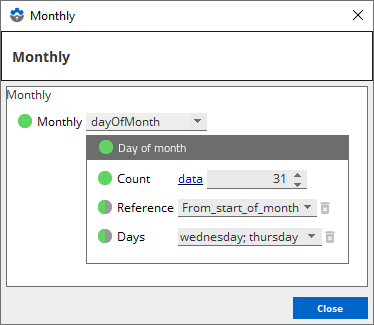
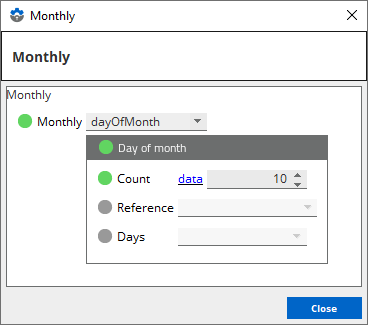
Beginning Geneos 5.4.x, the `dayOfMonth` option is available to the FTM sampler.

![Day of month option on the Gateway Setup Editor](https://docscdn.itrsgroup.com/geneos/images/plug-ins/ftm-day-of-month.png)

<div class="table-container">
<table class="legacy-table" style="width: 100%; mc-table-style: url('../Resources/TableStyles/ref_2_col_table.css'); margin-left: 0; margin-right: auto;" class="TableStyle-ref_2_col_table" cellspacing="0">
                            <col class="TableStyle-ref_2_col_table-Column-Column1"/>
                            <col class="TableStyle-ref_2_col_table-Column-Column1"/>
                            <thead>
                                <tr class="TableStyle-ref_2_col_table-Head-Header1">
                                    <th class="TableStyle-ref_2_col_table-HeadE-Column1-Header1">Option</th>
                                    <th class="TableStyle-ref_2_col_table-HeadD-Column1-Header1">Description</th>
                                </tr>
                            </thead>
                            <tbody>
                                <tr class="TableStyle-ref_2_col_table-Body-Body1">
                                    <td class="TableStyle-ref_2_col_table-BodyE-Column1-Body1">Count</td>
                                    <td class="TableStyle-ref_2_col_table-BodyD-Column1-Body1">
                                        <p>Sets the nth day of the month in which you want the file to arrive.</p>
                                        <p>If the count value exceeds the possible days of the month defined, then the FTM sampler sets the file to arrive on the last day of the month.</p>
                                        <p>Possible values: <code>1</code> to <code>31</code></p>
                                        <p>Default value: <code>1</code></p>
                                    </td>
                                </tr>
                                <tr class="TableStyle-ref_2_col_table-Body-Body1">
                                    <td class="TableStyle-ref_2_col_table-BodyE-Column1-Body1">Reference</td>
                                    <td class="TableStyle-ref_2_col_table-BodyD-Column1-Body1">
                                        <p>Sets the point of reference for counting the days of the month.</p>
                                        <p>Possible values:</p>
                                        <ul>
                                            <li><code>From_end_of_month</code> &#8212; the FTM sampler counts from the end of the month.</li>
                                            <li><code>From_start_of_month</code> &#8212; the FTM sampler counts from the start of the month.</li>
                                        </ul>
                                        <p>If not defined, then the FTM sampler counts from the start of the month.</p>
                                    </td>
                                </tr>
                                <tr class="TableStyle-ref_2_col_table-Body-Body1">
                                    <td class="TableStyle-ref_2_col_table-BodyE-Column1-Body1">Days</td>
                                    <td class="TableStyle-ref_2_col_table-BodyD-Column1-Body1">
                                        <p>Sets which days of the week to consider as a day of the month.</p>
                                        <p>If not defined, then it defaults to all days.</p>
                                    </td>
                                </tr>
                                <tr class="TableStyle-ref_2_col_table-Body-Body1">
                                    <td class="TableStyle-ref_2_col_table-BodyB-Column1-Body1"> </td>
                                    <td class="TableStyle-ref_2_col_table-BodyA-Column1-Body1"> </td>
                                </tr>
                            </tbody>
                        </table>
                        
</div>

###### Example usage

Consider the following calendar month of October 2020:

![Month of October 2020](https://docscdn.itrsgroup.com/geneos/images/plug-ins/ftm-calendar-example.png)

<div class="table-container">
<table class="legacy-table" style="width: 100%;margin-left: 0;margin-right: auto;mc-table-style: url('../Resources/TableStyles/ref_3_col_table.css');" class="TableStyle-ref_3_col_table" cellspacing="0">
                                <col class="TableStyle-ref_3_col_table-Column-Column1"/>
                                <col class="TableStyle-ref_3_col_table-Column-Column1"/>
                                <col class="TableStyle-ref_3_col_table-Column-Column1"/>
                                <thead>
                                    <tr class="TableStyle-ref_3_col_table-Head-Header1">
                                        <th class="TableStyle-ref_3_col_table-HeadE-Column1-Header1">FTM dayOfMonth setting</th>
                                        <th class="TableStyle-ref_3_col_table-HeadE-Column1-Header1">Behaviour</th>
                                        <th class="TableStyle-ref_3_col_table-HeadD-Column1-Header1">Result</th>
                                    </tr>
                                </thead>
                                <tbody>
                                    <tr class="TableStyle-ref_3_col_table-Body-Body1">
                                        <td class="TableStyle-ref_3_col_table-BodyE-Column1-Body1">
                                            <img class="content-img"  src="https://docscdn.itrsgroup.com/geneos/images/plug-ins/ftm-day-of-month-example-5th-workday.png" alt="FTM example &#8212; fifth workday of the month, given a Monday to Friday workweek" class="screenshot"/>
                                        </td>
                                        <td class="TableStyle-ref_3_col_table-BodyE-Column1-Body1">
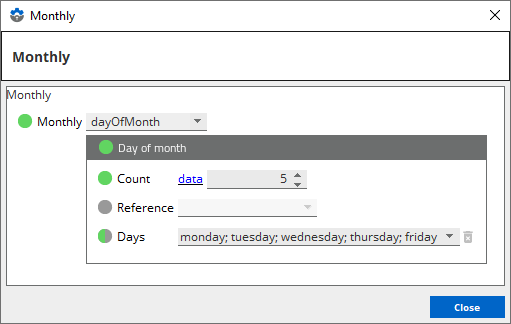
                                            <p>The FTM sampler considers the working days of the month to be Monday, Tuesday, Wednesday, Thursday, and Friday.</p>
                                            <p>The file is expected to arrive on the fifth workday of the month.</p>
                                        </td>
                                        <td class="TableStyle-ref_3_col_table-BodyD-Column1-Body1">The file arrives on Wednesday, 7 October 2020.</td>
                                    </tr>
                                    <tr class="TableStyle-ref_3_col_table-Body-Body1">
                                        <td class="TableStyle-ref_3_col_table-BodyE-Column1-Body1">
                                            <img class="content-img"  src="https://docscdn.itrsgroup.com/geneos/images/plug-ins/ftm-day-of-month-example-3rd-workday-reverse.png" alt="FTM example &#8212; third to the last workday of the month, given a Monday to Friday workweek" class="screenshot"/>
                                        </td>
                                        <td class="TableStyle-ref_3_col_table-BodyE-Column1-Body1">
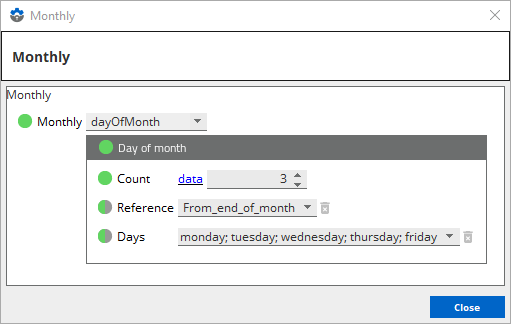
                                            <p>The FTM sampler considers the working days of the month to be Monday, Tuesday, Wednesday, Thursday, and Friday.</p>
                                            <p>The file is expected to arrive on the third workday from the end of the month.</p>
                                        </td>
                                        <td class="TableStyle-ref_3_col_table-BodyD-Column1-Body1">The file arrives on Wednesday, 28 October 2020.</td>
                                    </tr>
                                    <tr class="TableStyle-ref_3_col_table-Body-Body1">
                                        <td class="TableStyle-ref_3_col_table-BodyE-Column1-Body1">
                                            <img class="content-img"  src="https://docscdn.itrsgroup.com/geneos/images/plug-ins/ftm-day-of-month-example-1st-friday.png" class="screenshot" alt="FTM example &#8212; first Friday of the month"/>
                                        </td>
                                        <td class="TableStyle-ref_3_col_table-BodyE-Column1-Body1">
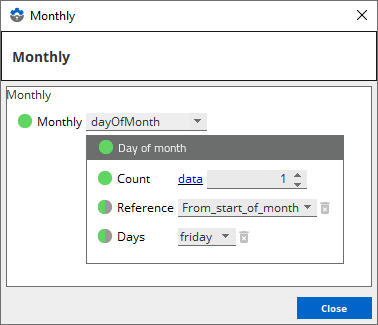
                                            <p>The FTM sampler considers the working days of the month to only be Friday.</p>
                                            <p>The file is expected to arrive on the first Friday of the month.</p>
                                        </td>
                                        <td class="TableStyle-ref_3_col_table-BodyD-Column1-Body1">The file arrives on Friday, 2 October 2020.</td>
                                    </tr>
                                    <tr class="TableStyle-ref_3_col_table-Body-Body1">
                                        <td class="TableStyle-ref_3_col_table-BodyE-Column1-Body1">
                                            <img class="content-img"  src="https://docscdn.itrsgroup.com/geneos/images/plug-ins/ftm-day-of-month-example-last-monday.png" alt="FTM example &#8212; last Monday of the month" class="screenshot"/>
                                        </td>
                                        <td class="TableStyle-ref_3_col_table-BodyE-Column1-Body1">
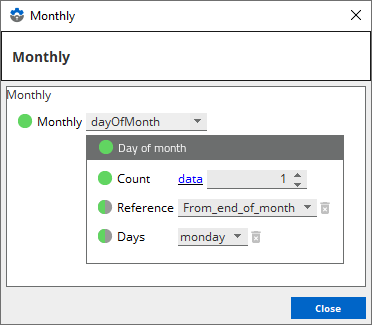
                                            <p>The FTM sampler considers the working days of the month to only be Monday.</p>
                                            <p>The file is expected to arrive on the last Monday of the month.</p>
                                        </td>
                                        <td class="TableStyle-ref_3_col_table-BodyD-Column1-Body1">The file arrives on Monday, 26 October 2020.</td>
                                    </tr>
                                    <tr class="TableStyle-ref_3_col_table-Body-Body1">
                                        <td class="TableStyle-ref_3_col_table-BodyE-Column1-Body1">
                                            <img class="content-img"  src="https://docscdn.itrsgroup.com/geneos/images/plug-ins/ftm-day-of-month-example-31st-workday.png" alt="FTM example &#8212; 31st workday of the month" class="screenshot"/>
                                        </td>
                                        <td class="TableStyle-ref_3_col_table-BodyE-Column1-Body1">
                                            <p>The FTM sampler considers the working days of the month to be Wednesday and Thursday.</p>
                                            <p>The file is expected to arrive on the 31st workday of the month.</p>
                                            <p>Since this workday exceeds the number of workdays in the month, the FTM sampler considers the last workday of the month, instead.</p>
                                        </td>
                                        <td class="TableStyle-ref_3_col_table-BodyD-Column1-Body1">The file arrives on Thursday, 29 October 2020.</td>
                                    </tr>
                                    <tr class="TableStyle-ref_3_col_table-Body-Body1">
                                        <td class="TableStyle-ref_3_col_table-BodyE-Column1-Body1">
                                            <img class="content-img"  src="https://docscdn.itrsgroup.com/geneos/images/plug-ins/ftm-day-of-month-example-10th-day.png" alt="FTM example &#8212; tenth day of the month" class="screenshot"/>
                                        </td>
                                        <td class="TableStyle-ref_3_col_table-BodyE-Column1-Body1">
                                            <p>The FTM sampler considers all days of the month.</p>
                                            <p>The file is expected to arrive every 10th of the month.</p>
                                        </td>
                                        <td class="TableStyle-ref_3_col_table-BodyD-Column1-Body1">The file arrives on Saturday, 10 October 2020.</td>
                                    </tr>
                                    <tr class="TableStyle-ref_3_col_table-Body-Body1">
                                        <td class="TableStyle-ref_3_col_table-BodyB-Column1-Body1"> </td>
                                        <td class="TableStyle-ref_3_col_table-BodyB-Column1-Body1"> </td>
                                        <td class="TableStyle-ref_3_col_table-BodyA-Column1-Body1"> </td>
                                    </tr>
                                </tbody>
                            </table>
                        
</div>

### files > file > tzOffset

The time-zone offset is used when files have date / time formatting in the filename, but the file is produced in a time-zone which may lead to the file having a different date from the expected.

The parameter specifies the number of hours difference between the time-zone the probe is running in and the time-zone in which the file is produced. For example, if the Netprobe is running in London and the file is produced in New York with a time difference of -5 hours, then tzOffset should be set to -5. This way, if the file is produced at 10pm in New York (3am in London), FTM will know to expect a filename with what will be the previous days date.

Mandatory: No

Units: Hours

Default: `0`

### files > file > monitoringPeriod

Specifies the monitoring period. If the monitoring period is also set at the sampler level, then it will not be applied to the file.

Mandatory: No

Default: `periodAlias` > `Noon_to_noon`

### files > file > monitoringPeriod > periodAlias


 Specifies the monitoring period using a period alias. The following are the possible values:

Mandatory: No

Default: `Noon_to_noon`

<div class="table-container">
<table class="legacy-table"   style="margin-left: 0;margin-right: auto;width: 100%;mc-table-style: url('../../TableStyles/ref_2_col_table.css');" cellspacing="0">
            <col style="width: 50%;" class="TableStyle-ref_2_col_table-Column-Column1"/>
            <col style="width: 50%;" class="TableStyle-ref_2_col_table-Column-Column1"/>
            <thead>
                <tr class="TableStyle-ref_2_col_table-Head-Header1">
                    <th class="TableStyle-ref_2_col_table-HeadE-Column1-Header1"><strong>Setting</strong>
                    </th>
                    <th class="TableStyle-ref_2_col_table-HeadD-Column1-Header1"><strong>Description</strong>
                    </th>
                </tr>
            </thead>
            <tbody valign="top">
                <tr class="TableStyle-ref_2_col_table-Body-Body1">
                    <td class="TableStyle-ref_2_col_table-BodyE-Column1-Body1"><code>Noon_to_noon</code>
                    </td>
                    <td class="TableStyle-ref_2_col_table-BodyD-Column1-Body1">Monitoring period starts at 12:00pm and
 ends at 11:59am the following day.</td>
                </tr>
                <tr class="TableStyle-ref_2_col_table-Body-Body1">
                    <td class="TableStyle-ref_2_col_table-BodyE-Column1-Body1"><code>Midnight_to_midnight</code>
                    </td>
                    <td class="TableStyle-ref_2_col_table-BodyD-Column1-Body1">Monitoring period starts at 12:00am and
 ends at 11:59pm on the same day.</td>
                </tr>
                <tr class="TableStyle-ref_2_col_table-Body-Body1">
                    <td class="TableStyle-ref_2_col_table-BodyB-Column1-Body1">&#160;</td>
                    <td class="TableStyle-ref_2_col_table-BodyA-Column1-Body1">&#160;</td>
                </tr>
            </tbody>
        </table>
        
</div>


### files > file > monitoringPeriod > periodStartTime


Specifies the monitoring period using a specific time in `HH:MM` format. For example, if `12:00` is set as the periodStartTime, then it is the same with the `Noon_to_noon` period alias.

Mandatory: No

Default: `12:00`


### files > file > alias

Specifies a more readable name for the file to be displayed in the first column of the view.

Mandatory: No

Default: Original filename

### files > file > activePeriod

An amount in seconds that gets added before and after the expected time of a file to provide a period during which file arrivals should be recognized and responded to and ignored otherwise. This is useful when you are monitoring the arrival of a file with the same name two or more times during the day. If a file arrives after (expectedTime + activePeriod), then none of the displayed metrics should be affected.

Mandatory: No

Default: Nothing

### monitoringPeriod

Specifies the monitoring period. If the monitoring period is also set at the file level, then the value in this setting will not be applied to the file.

Mandatory: No

Default: `periodAlias` > `Noon_to_noon`

### monitoringPeriod > periodAlias


 Specifies the monitoring period using a period alias. The following are the possible values:

Mandatory: No

Default: `Noon_to_noon`

<div class="table-container">
<table class="legacy-table"   style="margin-left: 0;margin-right: auto;width: 100%;mc-table-style: url('../../TableStyles/ref_2_col_table.css');" cellspacing="0">
            <col style="width: 50%;" class="TableStyle-ref_2_col_table-Column-Column1"/>
            <col style="width: 50%;" class="TableStyle-ref_2_col_table-Column-Column1"/>
            <thead>
                <tr class="TableStyle-ref_2_col_table-Head-Header1">
                    <th class="TableStyle-ref_2_col_table-HeadE-Column1-Header1"><strong>Setting</strong>
                    </th>
                    <th class="TableStyle-ref_2_col_table-HeadD-Column1-Header1"><strong>Description</strong>
                    </th>
                </tr>
            </thead>
            <tbody valign="top">
                <tr class="TableStyle-ref_2_col_table-Body-Body1">
                    <td class="TableStyle-ref_2_col_table-BodyE-Column1-Body1"><code>Noon_to_noon</code>
                    </td>
                    <td class="TableStyle-ref_2_col_table-BodyD-Column1-Body1">Monitoring period starts at 12:00pm and
 ends at 11:59am the following day.</td>
                </tr>
                <tr class="TableStyle-ref_2_col_table-Body-Body1">
                    <td class="TableStyle-ref_2_col_table-BodyE-Column1-Body1"><code>Midnight_to_midnight</code>
                    </td>
                    <td class="TableStyle-ref_2_col_table-BodyD-Column1-Body1">Monitoring period starts at 12:00am and
 ends at 11:59pm on the same day.</td>
                </tr>
                <tr class="TableStyle-ref_2_col_table-Body-Body1">
                    <td class="TableStyle-ref_2_col_table-BodyB-Column1-Body1">&#160;</td>
                    <td class="TableStyle-ref_2_col_table-BodyA-Column1-Body1">&#160;</td>
                </tr>
            </tbody>
        </table>
        
</div>


### monitoringPeriod > periodStartTime


Specifies the monitoring period using a specific time in `HH:MM` format. For example, if `12:00` is set as the periodStartTime, then it is the same with the `Noon_to_noon` period alias.

Mandatory: No

Default: `12:00`


### holidays

Specifies the holidays, which can be defined in the following ways:

- As a date with `DD-Month-[YYYY]` format where
  - `DD` — day of the month. The leading `0` in the date is optional. For example, `1` and `01` are accepted.  - `Month` — short or full name of the month. For example, `Jan` and `January` are accepted.  - `YYYY` — year. When the year is not specified, the FTM plugin will automatically apply the holiday period every year.
- As a day such as `monday`, `tuesday`, `wednesday`, `thursday`, `friday`, `saturday`, and `sunday`.

While in the holiday period, the FTM plugin still monitors delays and file arrivals.

If the next day is set as a holiday, then the monitoring period is extended until the next monitoring period starts. For example:

- If the monitoringPeriod is `Noon_to_noon` and `saturday` and `sunday` are set as holidays, then on Friday, the monitoring period will start on Friday 12:00:00 and will end on Monday 11:59:59. The next non-holiday period after this will start on Monday noon.
- If the monitoringPeriod is `Midnight_to_midnight` and `saturday` and `sunday` are set as holidays, then the monitoring period will starts on Friday 00:00:00 and will end on Monday 23:59:59. The next non-holiday period after this will start on Monday midnight.

The monitoring period typically lasts 24 hours less 1 second. If the end of the monitoring period falls on a holiday, then the monitoring period is extended until the start of the next monitoring period. The FTM plugin always sets the expected arrival date to a non-holiday date within the monitoring period. To further illustrate this, please see examples below:


**Caution**

  If [monitoredDays](#monitoreddays) is set, then any configuration in the `holidays` settings will not affect the FTM plugin. 


Mandatory: No

Default: `saturday` and `sunday`

<div class="table-container">
<table class="legacy-table" style="width: 100%; mc-table-style: url('../Resources/TableStyles/ref_4_col_table.css'); margin-left: auto; margin-right: auto;" class="TableStyle-ref_4_col_table" cellspacing="0">
                    <col class="TableStyle-ref_4_col_table-Column-Column1"/>
                    <col class="TableStyle-ref_4_col_table-Column-Column1"/>
                    <col class="TableStyle-ref_4_col_table-Column-Column1"/>
                    <col class="TableStyle-ref_4_col_table-Column-Column1"/>
                    <thead>
                        <tr class="TableStyle-ref_4_col_table-Head-Header1">
                            <th class="TableStyle-ref_4_col_table-HeadE-Column1-Header1">Monitoring Period</th>
                            <th class="TableStyle-ref_4_col_table-HeadE-Column1-Header1">Holidays</th>
                            <th class="TableStyle-ref_4_col_table-HeadE-Column1-Header1">Files</th>
                            <th class="TableStyle-ref_4_col_table-HeadD-Column1-Header1">Expected values in FTM on a Friday afternoon</th>
                        </tr>
                    </thead>
                    <tbody>
                        <tr class="TableStyle-ref_4_col_table-Body-Body1">
                            <td class="TableStyle-ref_4_col_table-BodyE-Column1-Body1"><code>Noon_to_noon</code>
                            </td>
                            <td class="TableStyle-ref_4_col_table-BodyE-Column1-Body1"><code>saturday</code> and<code> sunday</code></td>
                            <td class="TableStyle-ref_4_col_table-BodyE-Column1-Body1">
                                <p>File 1 arriving in the morning</p>
                                <p>File 2 arriving in the afternoon</p>
                            </td>
                            <td class="TableStyle-ref_4_col_table-BodyD-Column1-Body1">
                                <p><strong>periodStart</strong>: Friday 12:00:00</p>
                                <p><strong>periodEnd</strong>: Monday 11:59:59</p>
                                <p><strong>expectedTime</strong> for File 1: Monday morning</p>
                                <p><strong>expectedTime</strong> for File 2: Friday afternoon</p>
                            </td>
                        </tr>
                        <tr class="TableStyle-ref_4_col_table-Body-Body1">
                            <td class="TableStyle-ref_4_col_table-BodyE-Column1-Body1"><code>Midnight_to_midnight</code>
                            </td>
                            <td class="TableStyle-ref_4_col_table-BodyE-Column1-Body1"><code>saturday</code> and<code> sunday</code></td>
                            <td class="TableStyle-ref_4_col_table-BodyE-Column1-Body1">
                                <p>File 1 arriving in the morning</p>
                                <p>File 2 arriving in the afternoon</p>
                            </td>
                            <td class="TableStyle-ref_4_col_table-BodyD-Column1-Body1">
                                <p><strong>periodStart</strong>: Friday 00:00:00</p>
                                <p><strong>periodEnd</strong>: Monday 23:59:59</p>
                                <p><strong>expectedTime</strong> for File 1: Friday morning</p>
                                <p><strong>expectedTime</strong> for File 2: Friday afternoon</p>
                            </td>
                        </tr>
                        <tr class="TableStyle-ref_4_col_table-Body-Body1">
                            <td class="TableStyle-ref_4_col_table-BodyB-Column1-Body1"> </td>
                            <td class="TableStyle-ref_4_col_table-BodyB-Column1-Body1"> </td>
                            <td class="TableStyle-ref_4_col_table-BodyB-Column1-Body1"> </td>
                            <td class="TableStyle-ref_4_col_table-BodyA-Column1-Body1"> </td>
                        </tr>
                    </tbody>
                </table>
                
</div>

### monitoredDays

This setting allows FTM to track arriving files and compute delays only on certain days of the week. Each day will be monitored for a 24-hour period starting on the time configured in the [monitoringPeriod](#monitoringperiod). On a non-monitored day, all the arriving files are ignored and delays are not computed.

The [holidays](#holidays) configuration is ignored if this option is used.


**Caution**

  The [monitoredDays](#monitoreddays) and the [files > file > expectedPeriod](#files--file--expectedperiod) settings are not compatible. The behaviour is undefined, if these two settings are used in conjunction.


Mandatory: No

Default: If [monitoredDays](#monitoreddays) is not set, the configuration from the [files > file > expectedPeriod](#files--file--expectedperiod) setting will be applied.

### consistentDateStamps

By default, the FTM plugin uses the Netprobe host's date and timestamp as reference for its date and time resolution. For example, the filename function `<previous_monitored_day...>` uses the Netprobe host's date and timestamp and the value of the **monitoredDays** setting to determine the filename.

If **consistentDateStamps** is set to `true`, the expected filename is based on the date and time at the start of the monitoring period. For example, the filename function `<previous_monitored_day...>` uses the date and time of the start of the monitoring period and the value of the **monitoredDays** setting to determine the filename.

Mandatory: No

Default: `false`

### displayTimeInIso8601Format

Allows you to configure the date and time format in the date-time columns of the FTM dataview. If this setting is set to `true`, then the dates and times are displayed in ISO 8601 format. If this setting is disabled or set to `false`, then the dates and times are displayed in the FTM format.

The following are examples of the FTM and ISO 8601 date and time formats:

Mandatory: No

Default: `false`

<div class="table-container">
<table class="legacy-table" style="width: 100%;margin-left: 0;margin-right: auto;mc-table-style: url('../Resources/TableStyles/ref_2_col_table.css');" class="TableStyle-ref_2_col_table" cellspacing="0">
                    <col class="TableStyle-ref_2_col_table-Column-Column1"/>
                    <col class="TableStyle-ref_2_col_table-Column-Column1"/>
                    <thead xmlns="">
                        <tr class="TableStyle-ref_2_col_table-Head-Header1">
                            <th class="TableStyle-ref_2_col_table-HeadE-Column1-Header1">Format</th>
                            <th class="TableStyle-ref_2_col_table-HeadD-Column1-Header1">Sample value</th>
                        </tr>
                    </thead>
                    <tbody>
                        <tr class="TableStyle-ref_2_col_table-Body-Body1">
                            <td class="TableStyle-ref_2_col_table-BodyE-Column1-Body1">FTM format</td>
                            <td class="TableStyle-ref_2_col_table-BodyD-Column1-Body1"><code>Wednesday September 30 12:59:59</code>
                            </td>
                        </tr>
                        <tr class="TableStyle-ref_2_col_table-Body-Body1">
                            <td class="TableStyle-ref_2_col_table-BodyE-Column1-Body1">ISO 8601 Format</td>
                            <td class="TableStyle-ref_2_col_table-BodyD-Column1-Body1"><code>2022-09-30T12:59:59+08:00</code>
                            </td>
                        </tr>
                        <tr class="TableStyle-ref_2_col_table-Body-Body1">
                            <td class="TableStyle-ref_2_col_table-BodyB-Column1-Body1"> </td>
                            <td class="TableStyle-ref_2_col_table-BodyA-Column1-Body1"> </td>
                        </tr>
                    </tbody>
                </table>
                
</div>

### showPreviousDay

If set to `true`, then the FTM plugin generates and displays a separate **Previous Day** dataview. The data displayed in this dataview is stored in a file by the plugin when the current day ends based on the [monitoringPeriod](#monitoringperiod) setting.

If the [files > file > monitoringPeriod](#files--file--monitoringperiod) and [monitoringPeriod](#monitoringperiod) are set, then the [files > file > monitoringPeriod](#files-file-monitoringperiod) setting will be followed.

If the [monitoredDays](#monitoreddays) setting is configured and `today` is an unmonitored day, then the **Previous Day** dataview will display the file activities from the last monitored day.


**Note**

  The  **Previous Day** dataview is a snapshot of the last sample data in the previous monitoring period. Only the configured settings at the time of the last sampling of the previous monitoring period are applied in the  **Previous Day** dataview. New settings applied in the current monitoring period will not reflect in the  **Previous Day** dataview. 


Mandatory: No

Default: `false`

### previousDayFile

The full path of the file, including the filename, that the plugin should use for writing and reading data. The plugin should have a write permission to this location and file.

Mandatory: No

Default: `FTMpredaydata.dat`

### showActualFilename

If set to `true`, then an additional **actualFilename** column showing the actual filename of each file is displayed in the dataview. This is useful when you specify a file alias.

Mandatory: No

Default: `false`

### delayUnit

Specifies the unit of time of the values displayed in the **Delay** column.

The following are the possible values:

Mandatory: No

Default: `Seconds`

<div class="table-container">
<table class="legacy-table"   style="margin-left: 0;margin-right: auto;width: 100%;mc-table-style: url('../Resources/TableStyles/ref_2_col_table.css');" cellspacing="0">
                    <col style="width: 50%;" class="TableStyle-ref_2_col_table-Column-Column1"/>
                    <col style="width: 50%;" class="TableStyle-ref_2_col_table-Column-Column1"/>
                    <thead>
                        <tr class="TableStyle-ref_2_col_table-Head-Header1">
                            <th class="TableStyle-ref_2_col_table-HeadE-Column1-Header1"><strong>Setting</strong>
                            </th>
                            <th class="TableStyle-ref_2_col_table-HeadD-Column1-Header1"><strong>Description</strong>
                            </th>
                        </tr>
                    </thead>
                    <tbody valign="top">
                        <tr class="TableStyle-ref_2_col_table-Body-Body1">
                            <td class="TableStyle-ref_2_col_table-BodyE-Column1-Body1"><code>Seconds</code>
                            </td>
                            <td class="TableStyle-ref_2_col_table-BodyD-Column1-Body1">Displays the delay time in seconds.</td>
                        </tr>
                        <tr class="TableStyle-ref_2_col_table-Body-Body1">
                            <td class="TableStyle-ref_2_col_table-BodyE-Column1-Body1"><code>Minutes</code>
                            </td>
                            <td class="TableStyle-ref_2_col_table-BodyD-Column1-Body1">Displays the delay time in minutes.</td>
                        </tr>
                        <tr class="TableStyle-ref_2_col_table-Body-Body1">
                            <td class="TableStyle-ref_2_col_table-BodyE-Column1-Body1"><code>Hours</code>
                            </td>
                            <td class="TableStyle-ref_2_col_table-BodyD-Column1-Body1">Displays the delay time in hours.</td>
                        </tr>
                        <tr class="TableStyle-ref_2_col_table-Body-Body1">
                            <td class="TableStyle-ref_2_col_table-BodyB-Column1-Body1"> </td>
                            <td class="TableStyle-ref_2_col_table-BodyA-Column1-Body1"> </td>
                        </tr>
                    </tbody>
                </table>
                
</div>

### sizeUnit

Specifies the unit of size of the values displayed in the **currentFileSize** column.

The following are the possible values:

Mandatory: No

Default: `Kilobytes`

<div class="table-container">
<table class="legacy-table"   style="margin-left: 0;margin-right: auto;width: 100%;mc-table-style: url('../Resources/TableStyles/ref_2_col_table.css');" cellspacing="0">
                    <col style="width: 50%;" class="TableStyle-ref_2_col_table-Column-Column1"/>
                    <col style="width: 50%;" class="TableStyle-ref_2_col_table-Column-Column1"/>
                    <thead>
                        <tr class="TableStyle-ref_2_col_table-Head-Header1">
                            <th class="TableStyle-ref_2_col_table-HeadE-Column1-Header1"><strong>Setting</strong>
                            </th>
                            <th class="TableStyle-ref_2_col_table-HeadD-Column1-Header1"><strong>Description</strong>
                            </th>
                        </tr>
                    </thead>
                    <tbody valign="top">
                        <tr class="TableStyle-ref_2_col_table-Body-Body1">
                            <td class="TableStyle-ref_2_col_table-BodyE-Column1-Body1"><code>Bytes</code>
                            </td>
                            <td class="TableStyle-ref_2_col_table-BodyD-Column1-Body1">Displays the current file size in
 bytes.</td>
                        </tr>
                        <tr class="TableStyle-ref_2_col_table-Body-Body1">
                            <td class="TableStyle-ref_2_col_table-BodyE-Column1-Body1"><code>Kilobytes</code>
                            </td>
                            <td class="TableStyle-ref_2_col_table-BodyD-Column1-Body1">Displays the current file size in
 kilobytes.</td>
                        </tr>
                        <tr class="TableStyle-ref_2_col_table-Body-Body1">
                            <td class="TableStyle-ref_2_col_table-BodyE-Column1-Body1"><code>Megabytes</code>
                            </td>
                            <td class="TableStyle-ref_2_col_table-BodyD-Column1-Body1">Displays the current file size in
 megabytes.</td>
                        </tr>
                        <tr class="TableStyle-ref_2_col_table-Body-Body1">
                            <td class="TableStyle-ref_2_col_table-BodyE-Column1-Body1"><code>Gigabytes</code>
                            </td>
                            <td class="TableStyle-ref_2_col_table-BodyD-Column1-Body1">Displays the current file size in
 gigabytes.</td>
                        </tr>
                        <tr class="TableStyle-ref_2_col_table-Body-Body1">
                            <td class="TableStyle-ref_2_col_table-BodyB-Column1-Body1"> </td>
                            <td class="TableStyle-ref_2_col_table-BodyA-Column1-Body1"> </td>
                        </tr>
                    </tbody>
                </table>
                
</div>

### useChangedTime

Determines whether `ctime` or `mtime` should be used when a monitored file arrived. If this setting is set to `true`, then `ctime` is used. Otherwise,  `mtime` is used.

Mandatory: No

Default: `false`